

Case Study · UX/UI Design · 2024
Designing the tour that doubled Goddard's enrollment pipeline
How a zero-to-one online tour scheduler became the highest-performing conversion touchpoint across 500+ franchise locations.
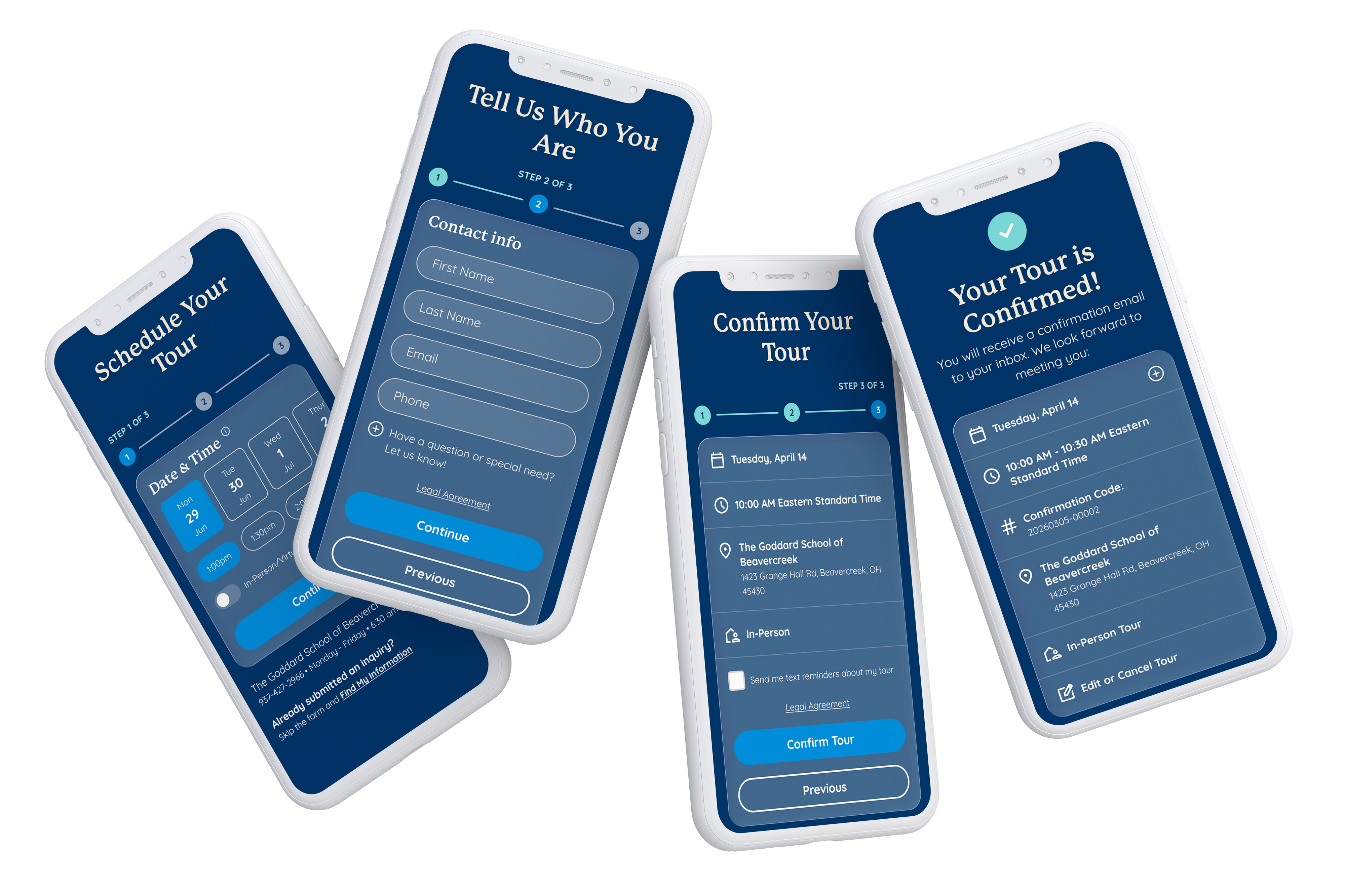
Results
Increase in scheduled tours after implementing refined solution
Increase in school enrollment system-wide after full implementation (not the pilot) of refined solution.
Statistics captured Aug – Dec 2024 across all Goddard School franchise locations participating in online tour scheduler
Background
A premium brand and the broken first step
The Goddard School is a national franchise of 650+ private early childhood education centers, serving children from six weeks to six years old. Despite strong brand recognition and consistent demand, there was a significant friction point at the top of the enrollment funnel: parents who wanted to visit a school had to call to set up an appointment.
For a parent already navigating the most stressful consumer decision of their life, picking up the phone was one barrier too many.
"Nothing is more precious than their baby so every point of friction in the flow carries an emotional weight for the user."
The digital marketing team built an online tour scheduling system from scratch. It’s initial release had several friction points that failed to meet parents where they’re at. Some users could be scheduling a tour a 3am with a fussy baby in one hand, their phone in the other, and not enough sleep. This needed to be easier for them.
Research & Discovery
Understanding the parent
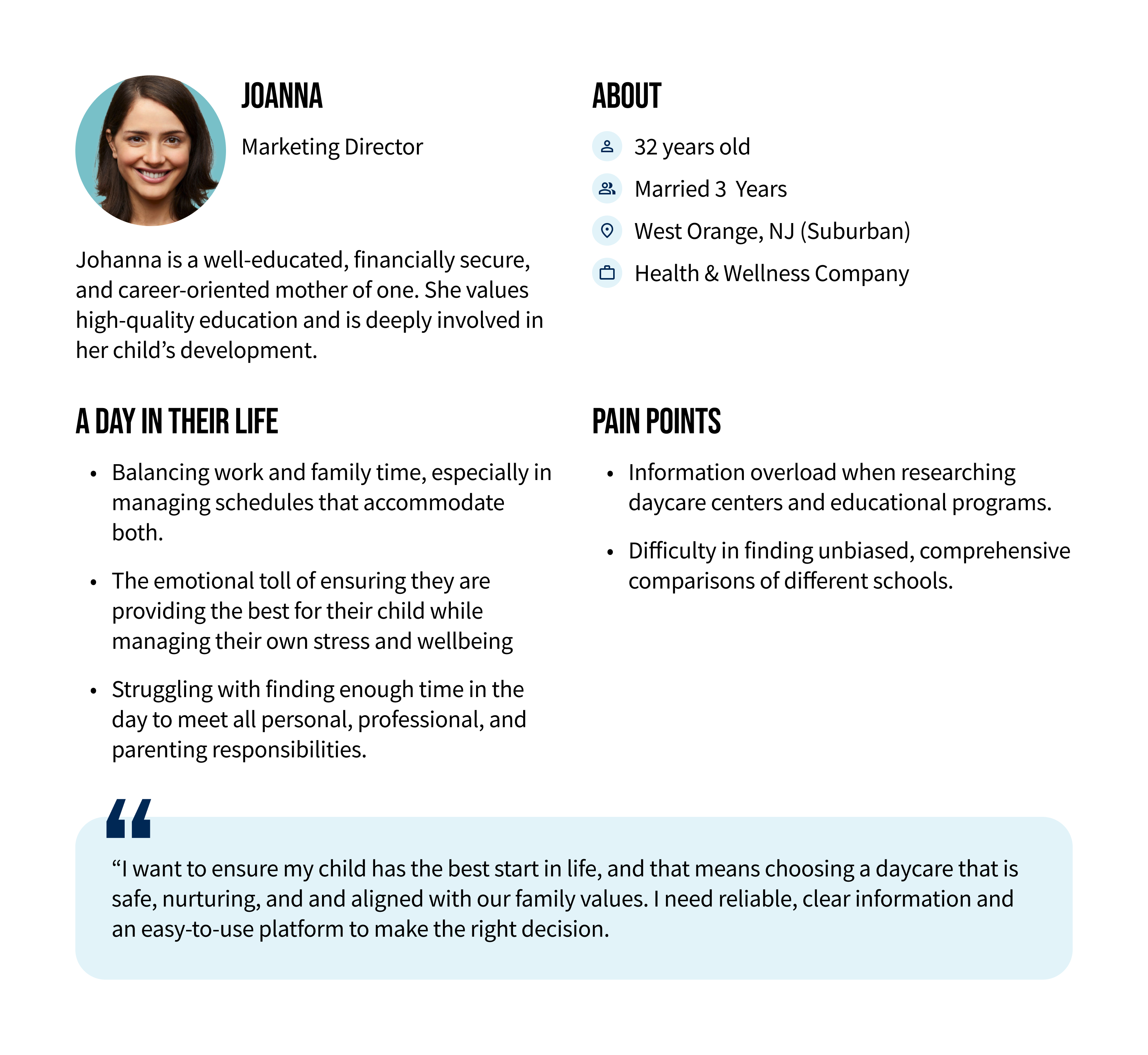
I drew on three sources to shape my understanding of the user: third-party market research on parent behavior in the early childhood education market, an internal Goddard consumer insights report built from parent surveys, and direct qualitative research I conducted.
High emotional stakes
70% of parents describe choosing a daycare or preschool as one of the most stressful decisions they've ever made. The bar for trust and the bar for frustration is insanley high.
Digital expectation
83% of parents who begin their school search online expect a seamless bridge between the digital experience and the in-person visit. A call based booking process breaks that expectation immediately.
Two user modes
The majority parents scheduling a tour want the soonest available slot, but some parents are expecting and planning months in advance. The design had to serve both without making either feel like an afterthought.
Time is the scarcest resource
Parents aren't leisurely comparing options. They're squeezing research in-between pumping schedules and nap time. Additional views, unnecessary text fields, and moments of confusion are a drop off risk.
Design Approach
Stop waisting their time and start converting them
The tour scheduler had to accomplish two things in sequence: capture lead information for Goddard's Franchisees, then let the parent lock in a time. When I inherited this project it was painfully clear the user was being asked for too much info at the doorstep.
Inherited user flow
The user was clicking a button that said “Schedule a Tour” and then being immediately asked to provide personal information, programs of interest, and only then where they able to schedule their tour. We weren’t making it easy for them to convert.
1
About you

2
Programs
3
Date

4
Time
5
Review
6
Confirm
Refined user flow
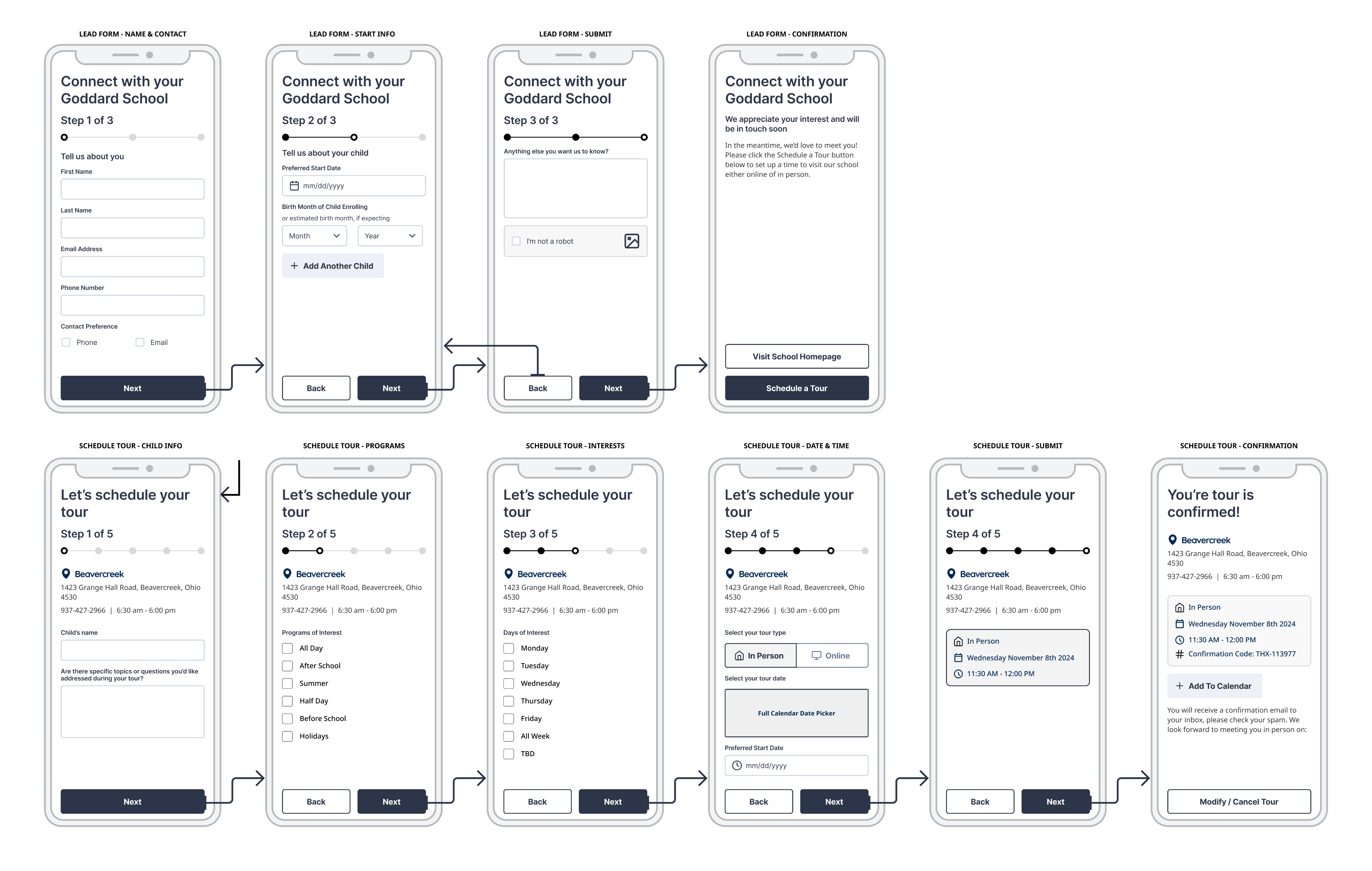
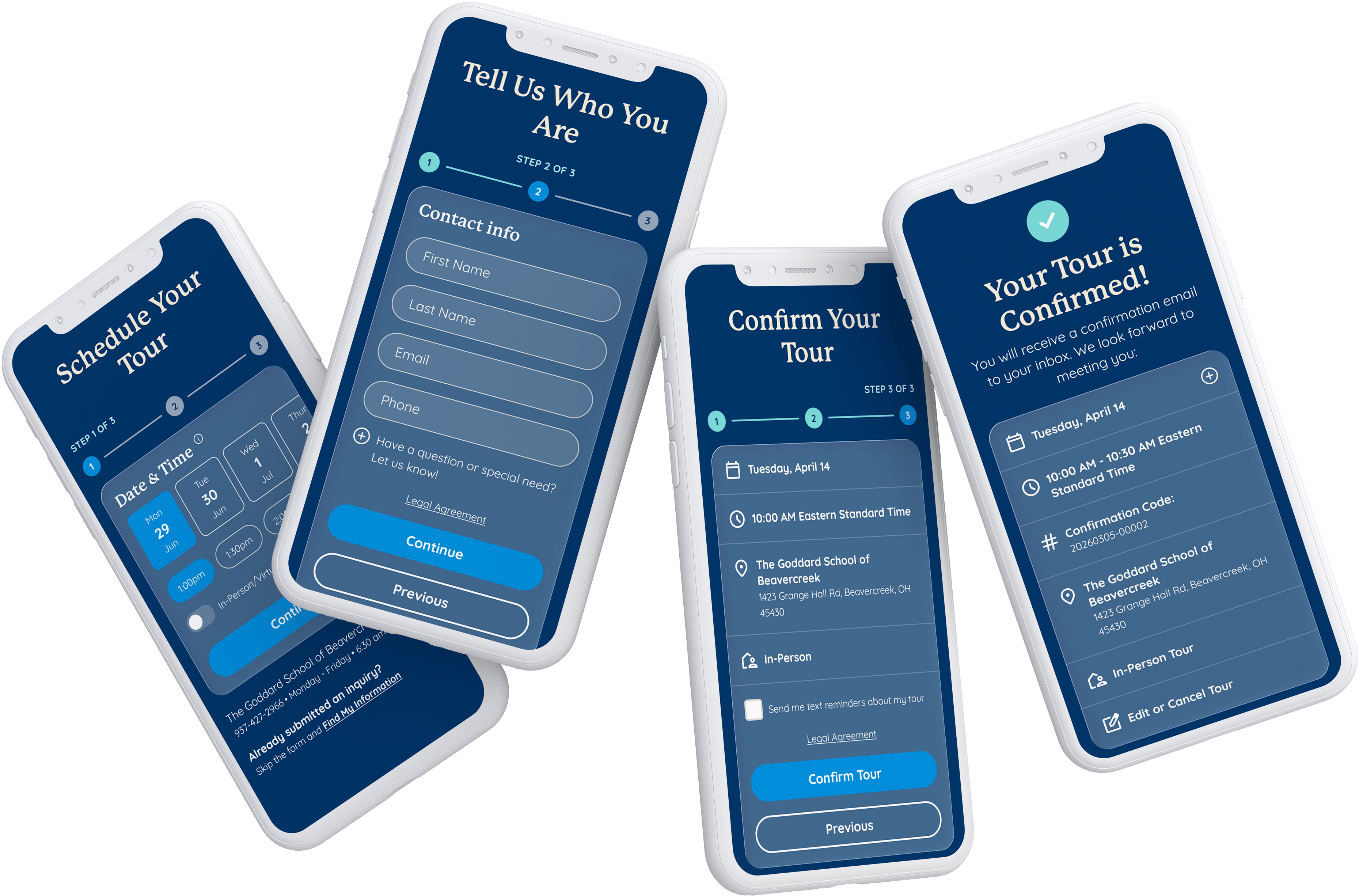
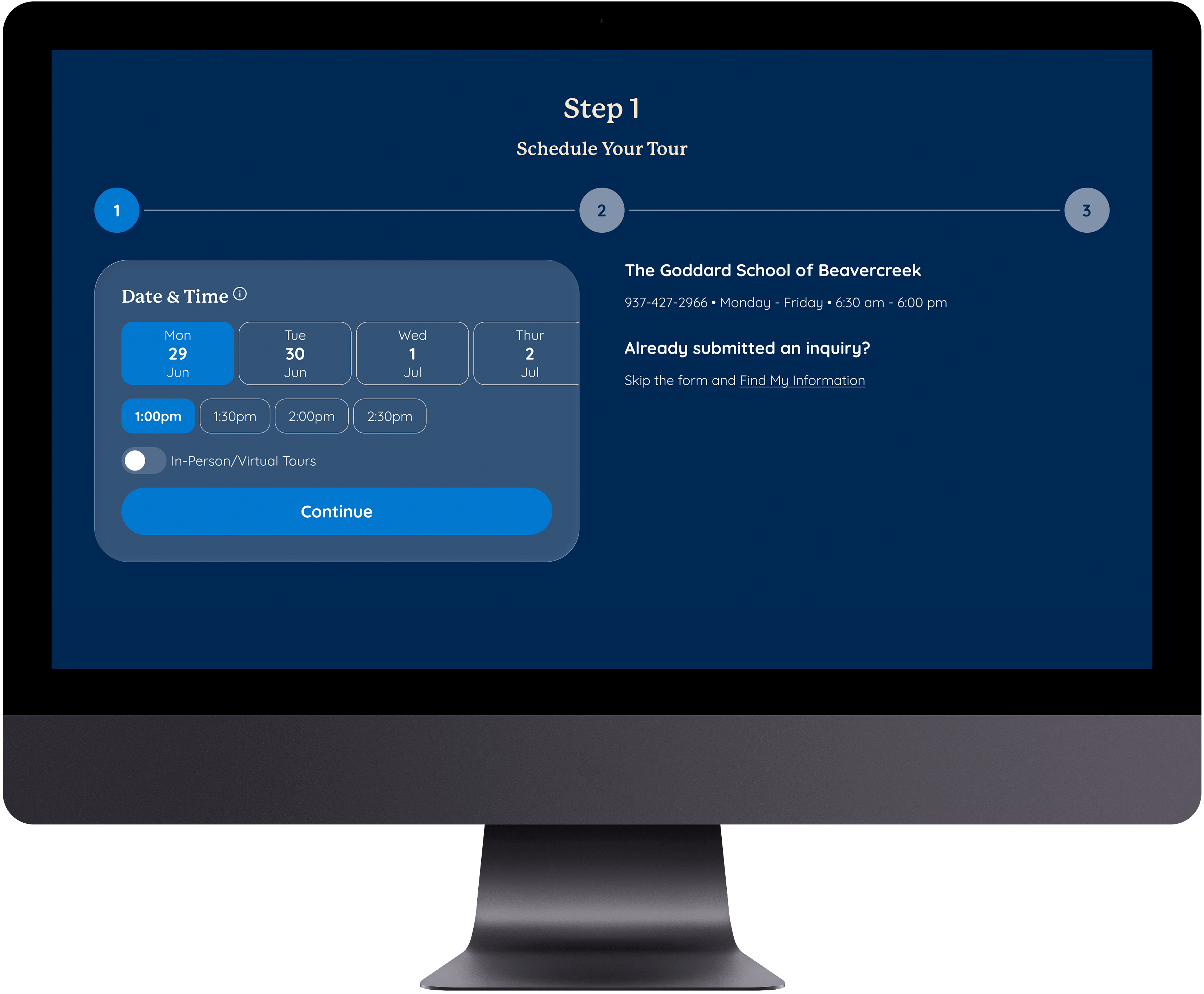
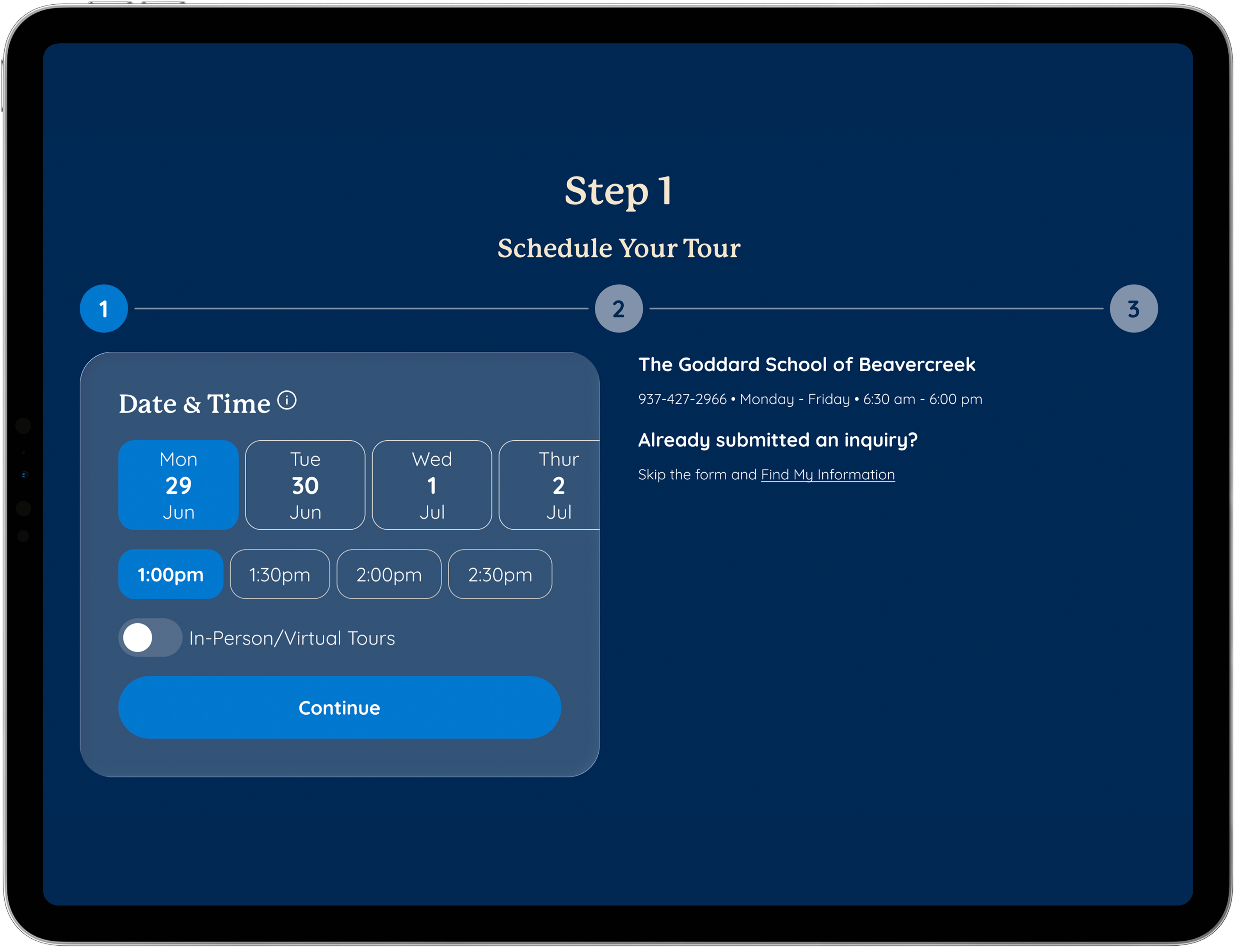
With this simmered down user flow the user is immediately able to schedule their tour after clicking a button that promised them just that. Once they’ve accomplished the task they set out to complete we ask them only for the bare minimum in terms of personal information so the franchisee can capture them as a lead in the system.
1
Date & Time
2
Parent Name & Contact
3
Confirm Tour
What this means for the FMS (Franchise Management System)
There was certainly some pushback when we presented the idea of completely changing the way leads are entered into the system from franchisee’s who would have to change their process. There was also significant back end functionality changes that our engineers would need to implement to the FMS (Franchise Management System). Once we presented the sharp increase in scheduled tours and system leads for schools that participated in the pilot program we where able to frame the refined design solution as true improvement to the current system, not a hypothesis. Presenting these finding to the business stakeholders got them on board to pushing the new process to all franchise locations. This is the kind of data we needed to get the green light to implement this new process for a system of 650+ schools and the backend FMS technology that school owners reported their leads into. This was the biggest UX win of my career.
Wireframing
Obsessing the end to end flow
I created wireframes of each step in the user flow which started from the lead form and ended on the tour confirmation view. When I took ownership of the project I found several fields that didn’t need to be displayed. Unfortunatley the way
I created wireframes of each step in the user flow which started from the lead form and ended on the tour confirmation view. When I took ownership of the project I found several fields that didn’t need to be displayed. Unfortunatley the way
Inherited user flow
Refined user flow
Winning Design
Let data drive the decisions
I created wireframes of each step in the user flow which started from the lead form and ended on the tour confirmation view. When I took ownership of the project I found several fields that didn’t need to be displayed. Unfortunatley the way
I created wireframes of each step in the user flow which started from the lead form and ended on the tour confirmation view. When I took ownership of the project I found several fields that didn’t need to be displayed. Unfortunatley the way
Case Study · UX/UI Design · 2024
Designing the tour that doubled Goddard's enrollment pipeline
How a zero-to-one online tour scheduler became the highest-performing conversion touchpoint across 500+ franchise locations.
Results
Increase in scheduled tours after implementing refined solution
Increase in school enrollment system-wide after full implementation (not the pilot) of refined solution.
Statistics captured Aug – Dec 2024 across all Goddard School franchise locations participating in online tour scheduler
Background
A premium brand and the broken first step
The Goddard School is a national franchise of 650+ private early childhood education centers, serving children from six weeks to six years old. Despite strong brand recognition and consistent demand, there was a significant friction point at the top of the enrollment funnel: parents who wanted to visit a school had to call to set up an appointment.
For a parent already navigating the most stressful consumer decision of their life, picking up the phone was one barrier too many.
"Nothing is more precious than their baby so every point of friction in the flow carries an emotional weight for the user."
The digital marketing team built an online tour scheduling system from scratch. It’s initial release had several friction points that failed to meet parents where they’re at. Some users could be scheduling a tour a 3am with a fussy baby in one hand, their phone in the other, and not enough sleep. This needed to be easier for them.
Research & Discovery
Understanding the parent
I drew on three sources to shape my understanding of the user: third-party market research on parent behavior in the early childhood education market, an internal Goddard consumer insights report built from parent surveys, and direct qualitative research I conducted.
High emotional stakes
70% of parents describe choosing a daycare or preschool as one of the most stressful decisions they've ever made. The bar for trust and the bar for frustration is insanley high.
Digital expectation
83% of parents who begin their school search online expect a seamless bridge between the digital experience and the in-person visit. A call based booking process breaks that expectation immediately.
Two user modes
The majority parents scheduling a tour want the soonest available slot, but some parents are expecting and planning months in advance. The design had to serve both without making either feel like an afterthought.
Time is the scarcest resource
Parents aren't leisurely comparing options. They're squeezing research in-between pumping schedules and nap time. Additional views, unnecessary text fields, and moments of confusion are a drop off risk.
Design Approach
Stop waisting their time and start converting them
The tour scheduler had to accomplish two things in sequence: capture lead information for Goddard's Franchisees, then let the parent lock in a time. When I inherited this project it was painfully clear the user was being asked for too much info at the doorstep.
Inherited user flow
The user was clicking a button that said “Schedule a Tour” and then being immediately asked to provide personal information, programs of interest, and only then where they able to schedule their tour. We weren’t making it easy for them to convert.
1
About you

2
Programs

3
Date

4
Time

5
Review

6
Confirm
Refined user flow
With this simmered down user flow the user is immediately able to schedule their tour after clicking a button that promised them just that. Once they’ve accomplished the task they set out to complete we ask them only for the bare minimum in terms of personal information so the franchisee can capture them as a lead in the system.
1
Date & Time

2
Parent Name & Contact

3
Confirm Tour
What this means for the FMS (Franchise Management System)
There was certainly some pushback when we presented the idea of completely changing the way leads are entered into the system from franchisee’s who would have to change their process. There was also significant back end functionality changes that our engineers would need to implement to the FMS (Franchise Management System). Once we presented the sharp increase in scheduled tours and system leads for schools that participated in the pilot program we where able to frame the refined design solution as true improvement to the current system, not a hypothesis. Presenting these finding to the business stakeholders got them on board to pushing the new process to all franchise locations. This is the kind of data we needed to get the green light to implement this new process for a system of 650+ schools and the backend FMS technology that school owners reported their leads into. This was the biggest UX win of my career.
Wireframing
Obsessing the end to end flow
I created wireframes of each step in the user flow which started from the lead form and ended on the tour confirmation view. When I took ownership of the project I found several fields that didn’t need to be displayed. Unfortunatley the way
Inherited user flow
There are several major issues with this flow. One of the biggest is how the user must take 10 steps to successfully schedule a tour. HR block asks less of their users to file taxes. The other major issues is how the user starts on the lead form and can essentially opt out of scheduling a tour. This is the smoking gun in drop off rates. Another major issue is how the flow is broken up in to a beginning 1-3 step process, then if you’re not totally fed up with us we ask you to complete another 1-5 step process. Ouch.
Refined user flow
Much like drinking a glass of ice water while through hiking death valley you’ll find the user flow below to be refreshing.
Winning Design
Let data drive the decisions
I created wireframes of each step in the user flow which started from the lead form and ended on the tour confirmation view. When I took ownership of the project I found several fields that didn’t need to be displayed. Unfortunatley the way
Case Study · UX/UI Design · 2024
Designing the tour that doubled Goddard's enrollment pipeline
How a zero-to-one online tour scheduler became the highest-performing conversion touchpoint across 500+ franchise locations.
Results
Increase in scheduled tours after implementing refined solution
Increase in school enrollment system-wide after full implementation (not the pilot) of refined solution.
Statistics captured Aug – Dec 2024 across all Goddard School franchise locations participating in online tour scheduler
Background
A premium brand and the broken first step
The Goddard School is a national franchise of 650+ private early childhood education centers, serving children from six weeks to six years old. Despite strong brand recognition and consistent demand, there was a significant friction point at the top of the enrollment funnel: parents who wanted to visit a school had to call to set up an appointment.
For a parent already navigating the most stressful consumer decision of their life, picking up the phone was one barrier too many.
"Nothing is more precious than their baby so every point of friction in the flow carries an emotional weight for the user."
The digital marketing team built an online tour scheduling system from scratch. It’s initial release had several friction points that failed to meet parents where they’re at. Some users could be scheduling a tour a 3am with a fussy baby in one hand, their phone in the other, and not enough sleep. This needed to be easier for them.
Research & Discovery
Understanding the parent
I drew on three sources to shape my understanding of the user: third-party market research on parent behavior in the early childhood education market, an internal Goddard consumer insights report built from parent surveys, and direct qualitative research I conducted.
High emotional stakes
70% of parents describe choosing a daycare or preschool as one of the most stressful decisions they've ever made. The bar for trust and the bar for frustration is insanley high.
Digital expectation
83% of parents who begin their school search online expect a seamless bridge between the digital experience and the in-person visit. A call based booking process breaks that expectation immediately.
Two user modes
The majority parents scheduling a tour want the soonest available slot, but some parents are expecting and planning months in advance. The design had to serve both without making either feel like an afterthought.
Time is the scarcest resource
Parents aren't leisurely comparing options. They're squeezing research in-between pumping schedules and nap time. Additional views, unnecessary text fields, and moments of confusion are a drop off risk.
Design Approach
Stop waisting their time and start converting them
The tour scheduler had to accomplish two things in sequence: capture lead information for Goddard's Franchisees, then let the parent lock in a time. When I inherited this project it was painfully clear the user was being asked for too much info at the doorstep.
Inherited user flow
The user was clicking a button that said “Schedule a Tour” and then being immediately asked to provide personal information, programs of interest, and only then where they able to schedule their tour. We weren’t making it easy for them to convert.
1
About you

2
Programs

3
Date

4
Time

5
Review

6
Confirm
Refined user flow
With this simmered down user flow the user is immediately able to schedule their tour after clicking a button that promised them just that. Once they’ve accomplished the task they set out to complete we ask them only for the bare minimum in terms of personal information so the franchisee can capture them as a lead in the system.
1
Date & Time

2
Parent Name & Contact

3
Confirm Tour
What this means for the FMS (Franchise Management System)
There was certainly some pushback when we presented the idea of completely changing the way leads are entered into the system from franchisee’s who would have to change their process. There was also significant back end functionality changes that our engineers would need to implement to the FMS (Franchise Management System). Once we presented the sharp increase in scheduled tours and system leads for schools that participated in the pilot program we where able to frame the refined design solution as true improvement to the current system, not a hypothesis. Presenting these finding to the business stakeholders got them on board to pushing the new process to all franchise locations. This is the kind of data we needed to get the green light to implement this new process for a system of 650+ schools and the backend FMS technology that school owners reported their leads into. This was the biggest UX win of my career.
Wireframing
Obsessing the end to end flow
I created wireframes of each step in the user flow which started from the lead form and ended on the tour confirmation view. When I took ownership of the project I found several fields that didn’t need to be displayed, and over all a lack of expediency which proved to be holding back the number of leads our schools where receiving.
Inherited user flow
There are several major issues with this flow. One of the biggest is how the user must take 10 steps to successfully schedule a tour. HR block asks less of their users to file taxes. The other major issues is how the user starts on the lead form and can essentially opt out of scheduling a tour. This is the smoking gun in drop off rates. Another major issue is how the flow is broken up in to a beginning 1-3 step process, then if you’re not totally fed up with us we ask you to complete another 1-5 step process. Ouch.
Refined user flow
Much like drinking a glass of ice water while through hiking death valley you’ll find the user flow below to be refreshing.
Winning Design
Let data drive the decisions
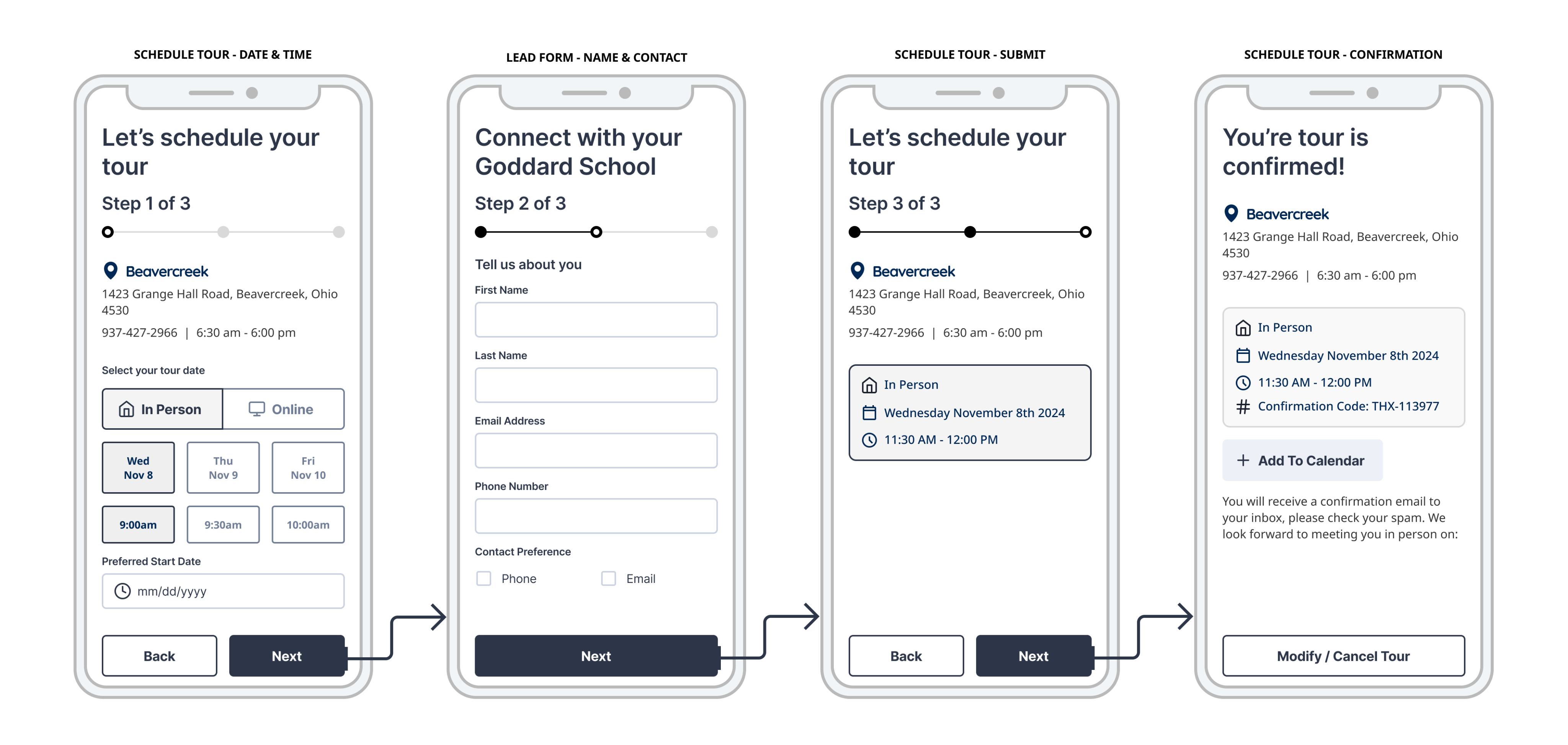
We created a pilot program where we ran A/B tests for a group of schools. Control was the inherited user flow and the variant was the refined user flow. We had engineering create the backend functionality to intake the reduced amount of lead information and respond through email to capture the rest of the data around child age, programs of interest, and desired start date.
Our hypothesis was confirmed and the refined user flow gained statistical significance quickly with a 96% lift within the first week of running. This gave us the positive data to present to stakeholders and ground our development initiative to rework the website, the leads management process, and FMS.